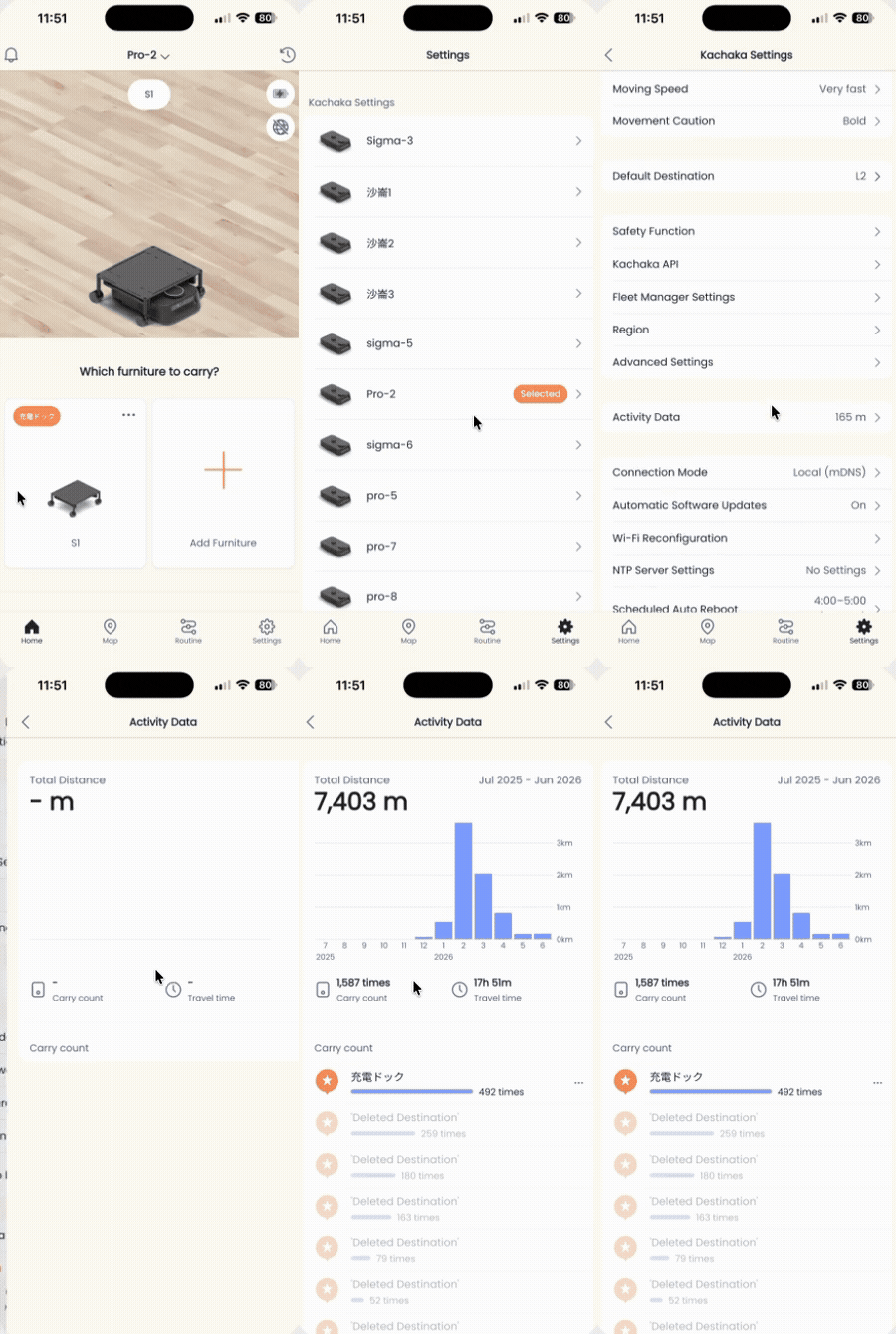
View Activity Data and Mileage
The Kachaka App includes an Activity Data page that lets you review the accumulated running record of each Kachaka or Kachaka Pro, so you can keep track of how much work the robot has actually done.
What you can see
- Monthly mileage: distance traveled, totaled by month.
- Yearly mileage: distance traveled over the past year.
- Delivery count: how many furniture-moving jobs the robot has completed.
- Run time: accumulated actual movement time.
How to view it
- Open the Kachaka App and switch to the Settings tab.
- Under Kachaka Settings, tap the Kachaka you want to check.
- Tap Activity Data to see the figures above.
Notes
- From the menu button (”⋯”) at the top of the Activity Data page, you can jump straight to Routine registration.
- Destinations from an old map, or destinations you have deleted, are grouped under “Deleted destinations” and still counted in the record.
- If the unit is replaced due to a fault, or you run a factory reset (deleting the Kachaka), the accumulated activity data is erased and cannot be recovered. To look up the unit’s identifying information, see Finding your robot’s serial number.
Screens