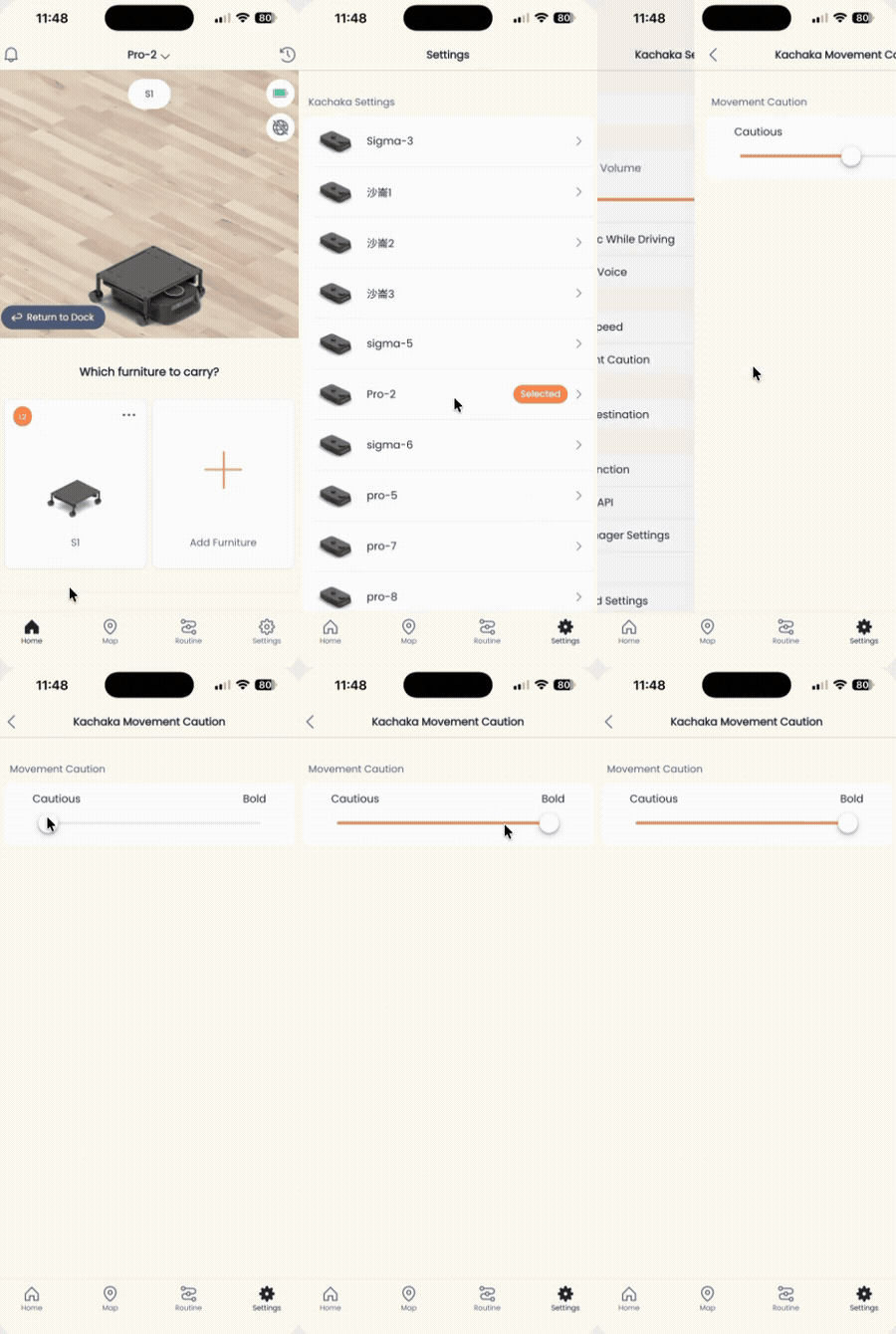
Adjust Movement Caution Level
When Kachaka plans a route, it weighs the clearance between a passage and nearby obstacles before deciding whether to push through. The Movement Caution setting in the app shifts that trade-off: a more cautious setting makes Kachaka detour or give up at tight spots, while a bolder setting makes it try harder to squeeze through.
The three caution levels
Caution runs across three levels, from lowest to highest:
- Cautious: The most conservative. Kachaka won’t force its way through anything slightly narrow. Behavior is the most stable, which suits crowded layouts with lots of furniture corners.
- Normal: The default, and a balanced choice for most situations.
- Bold: The most assertive. Kachaka is more willing than in Cautious mode to thread through narrower passages, which suits tight floor plans where you want it to reach the destination directly.
A quick way to remember it: Cautious < Normal < Bold. The bolder the setting, the more Kachaka will attempt narrow routes.
How to adjust it
- Open the Kachaka app and go to the Settings tab.
- Under Kachaka Settings, tap the specific Kachaka you want to adjust.
- Find Movement Caution near the center of the screen and open it.
- Drag the slider to choose the level you want between Cautious, Normal, and Bold.
How to choose
- If Kachaka often stops at tight spots, takes long detours, or reports that it can’t reach a destination, move toward Bold so it is more willing to try the passage.
- If Kachaka forces narrow gaps too aggressively, brushes against furniture, or gets stuck, move toward Cautious for more conservative routing.
Caution only changes how willing Kachaka is to attempt narrow routes; it does not turn off safety detection. The minimum passage width it can actually clear is still limited by the body and cargo dimensions; see Passage Width & Space Requirements. If you want Kachaka to avoid a stretch of route entirely, use No-Go Zones and Enterable Areas instead, which is more precise than adjusting caution.
Screens