
Skipping Arrival Position and Orientation Fine-Tuning
After Kachaka reaches a destination, by default it performs one more round of fine adjustment to line up with the registered position and the furniture’s front-facing orientation. If you care more about speed and don’t need the furniture’s front to be perfectly aligned, you can turn on the skip options in that destination’s edit settings to bypass this fine-tuning and finish the run faster.
This is a deliberate trade-off: you give up stop accuracy in exchange for speed. It suits situations where pace matters and exact stopping isn’t required. If you instead need high-precision stopping, see the related links below.
Two settings you can toggle independently
Each destination has these two switches, and they work independently of each other:
- Skip position adjustment: When on, if Kachaka judges that landing exactly on the registered coordinates is difficult, it stops near the destination instead of repeatedly correcting itself onto the exact spot.
- Skip orientation adjustment: When on, Kachaka stops as soon as it reaches the position, without rotating to adjust the furniture’s front-facing direction.
Both apply to a single destination, so you can let only your frequently used quick-delivery points skip fine-tuning while keeping the default behavior at points that need precise stopping.
Steps
- Open the Kachaka App and go to the Map tab.
- Tap the pin for the destination you want to adjust.
- Tap Edit Destination.
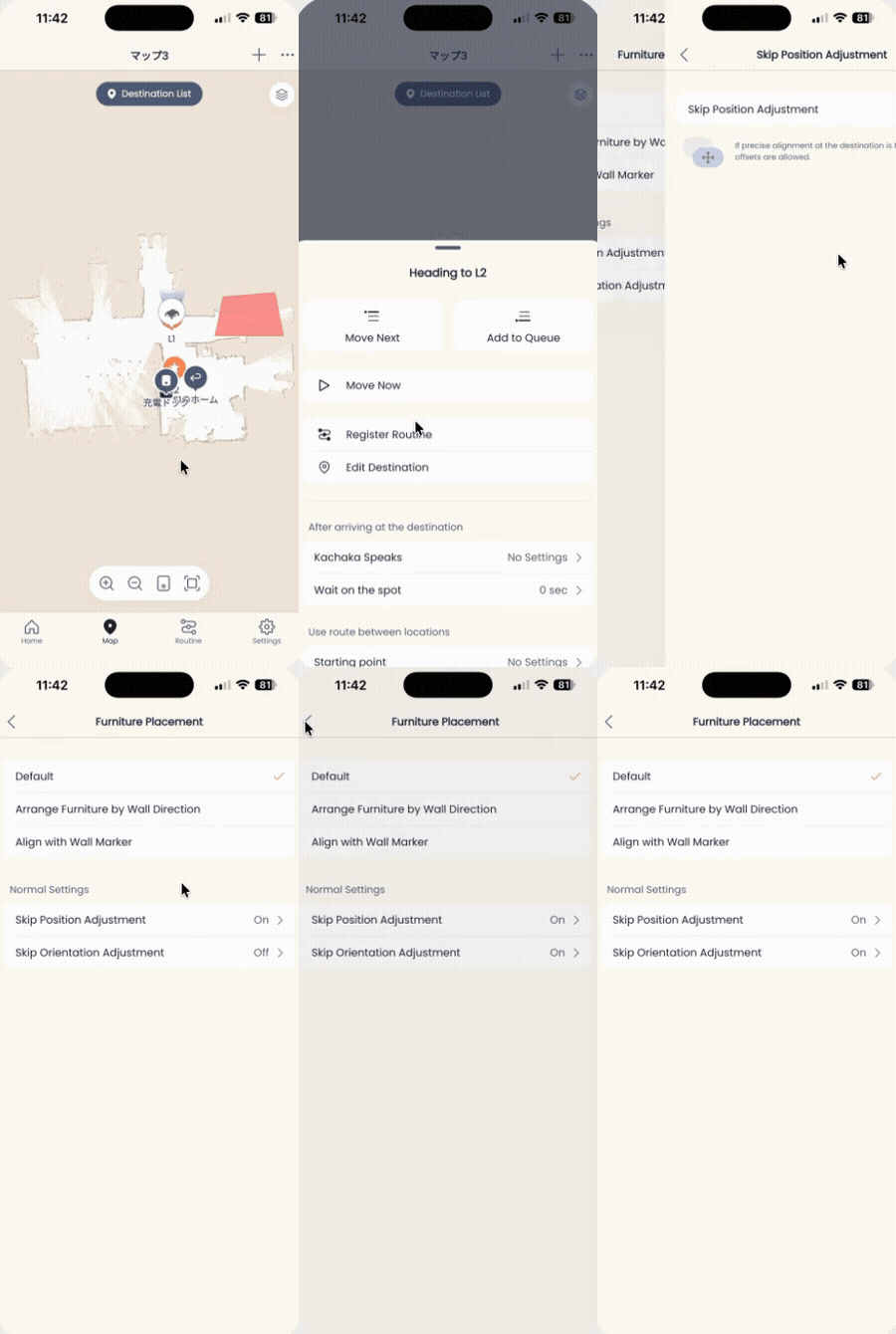
- Turn on Skip Position Adjustment, Skip Orientation Adjustment, or both, as needed.
The change takes effect immediately. On the next run to that destination, Kachaka skips the corresponding fine-tuning step.
Screens
Related
- Adding, Repositioning and Setting Default Destinations: this setting lives in the destination edit screen, so manage your destinations here first before adjusting a point.
- Furniture Storage Position: Wall Alignment and Reset: a furniture Home is also a destination, so wall alignment and the skip options on this page all live in the same Edit Destination screen.
- Moving Furniture: Basics: understand the delivery flow and the concept of the furniture’s front-facing direction.
- Stop Position Accuracy: the stop accuracy described here is exactly what this setting trades away.
- High-Precision Stopping with Wall Markers (Kachaka Pro): the opposite need — use this when you want higher stopping precision.