
Fails to Return to Charging Dock
When Kachaka cannot get back to its charging dock and the app shows a charging-failed message, the problem usually falls into one of two categories: it never reaches the dock, or it reaches the dock but keeps backing out and re-approaching without ever charging. Work through the checks below in order.
Case 1: Kachaka can’t reach the dock
Its position on the map has drifted
Open “Map” in the app and compare where Kachaka appears on the map with where it actually is. If the two clearly disagree, its self-localization has drifted, so it can’t find its way home.
Say “ねぇカチャカ、落ち着いて。” (calm down) to make it re-calibrate its position, then check whether things improve. If the drift keeps coming back, see Fixing Position Drift and Getting Lost.
A no-go zone is blocking the path
If you’ve drawn a no-go zone near the dock, it may be sealing off the route back. Confirm this, then do one of the following:
- Delete that no-go zone; or
- Move the zone outward so there’s a clear path between it and the dock.
See No-Go Zones and Enterable Areas for how to edit zones.
Not enough space around the dock
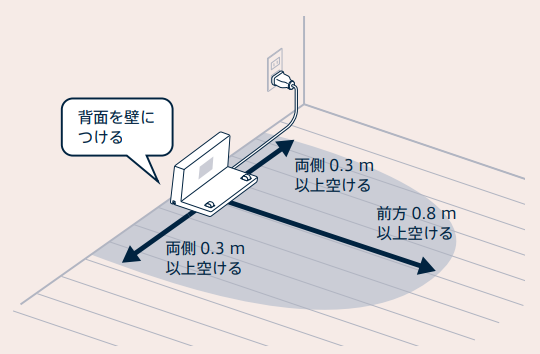
Kachaka needs room to maneuver and line up before it can settle onto the dock. Keep the following clearance around the charging dock:
- About 30 cm on each side
- About 80 cm in front
Clear clutter, furniture, and cables out of this area so it has room to align.
The dock can’t be recognized
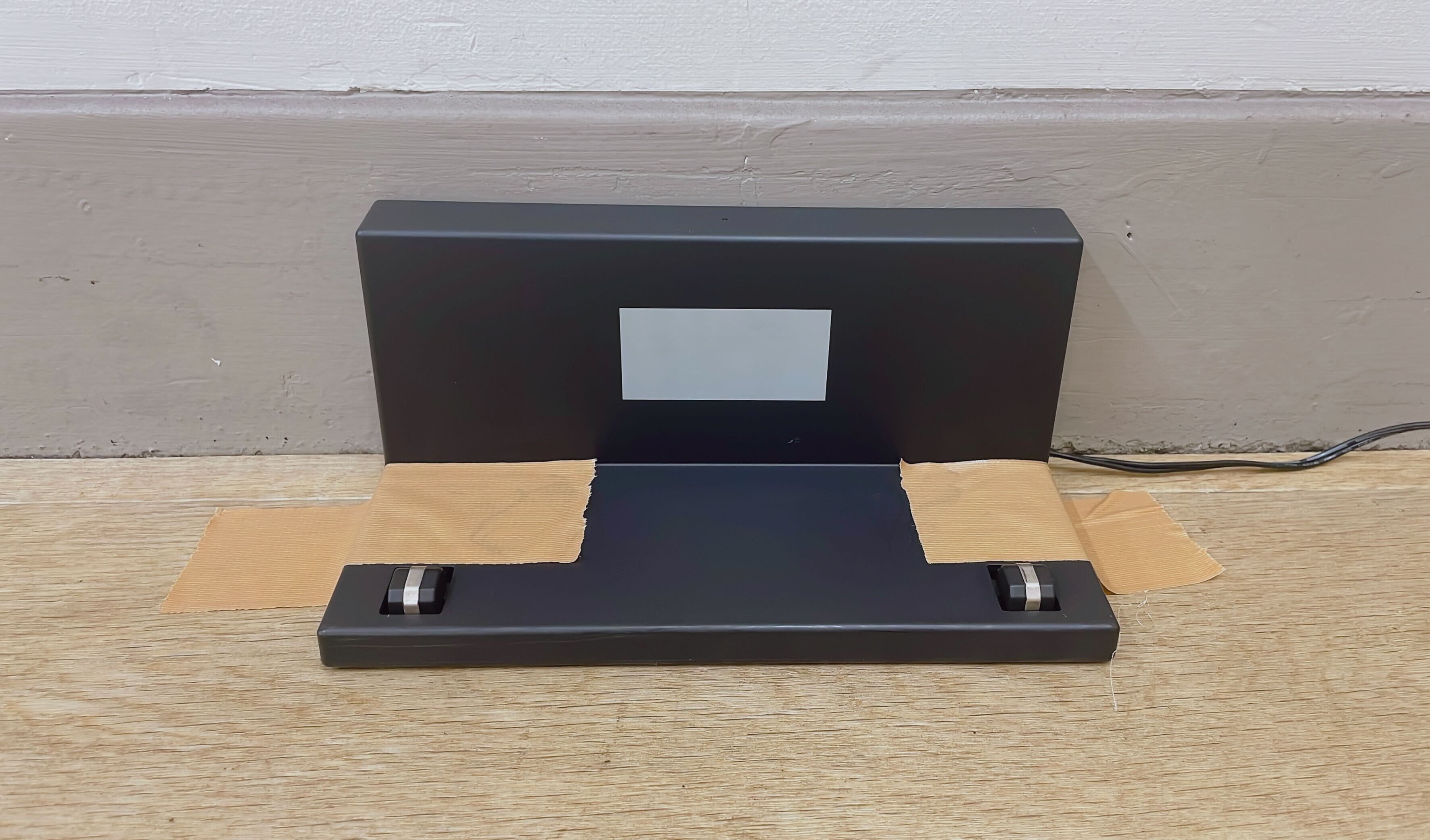
Taping the dock down from the top hides the features Kachaka uses to recognize the dock, so it can’t find it.
If you need to secure the dock, tape it on the underside or another spot that doesn’t block recognition — don’t cover the front or top of the dock.
Case 2: It reaches the dock but keeps going in and out
If Kachaka can line up with the dock but repeatedly backs out and re-approaches without ever charging, the most likely cause is that the dock itself has no power.
Confirm whether charging actually starts once Kachaka settles onto the dock. If it doesn’t, the dock’s AC adapter is usually loose or unplugged. For the full step-by-step checks (adapter green light, terminal cleaning, gap between robot and dock, and so on), see Placed on Dock but Not Charging.
Screens
Related
- Fixing Position Drift and Getting Lost
- No-Go Zones and Enterable Areas
- Placed on Dock but Not Charging
If these checks don’t resolve it, please contact Sigma.