Routines & Automation Not on home model
Kachaka Pro: Destination Arrival Time Limit
What this setting does
When Kachaka Pro is carrying furniture to a destination, it tries for 5 minutes by default. If it still hasn’t arrived within that time, it ends the carrying task.
Five minutes is plenty for most everyday trips. But in two situations you may want to adjust this limit yourself:
- Long-distance moves: Across floors, down long corridors, or in large areas, a single trip can legitimately take more than 5 minutes, and the default would cut the task short.
- Shorter retries: If you’d rather the robot give up faster when it gets stuck instead of trying for too long, set a lower limit.
This feature is Kachaka Pro only and is not available on the consumer model.
Steps
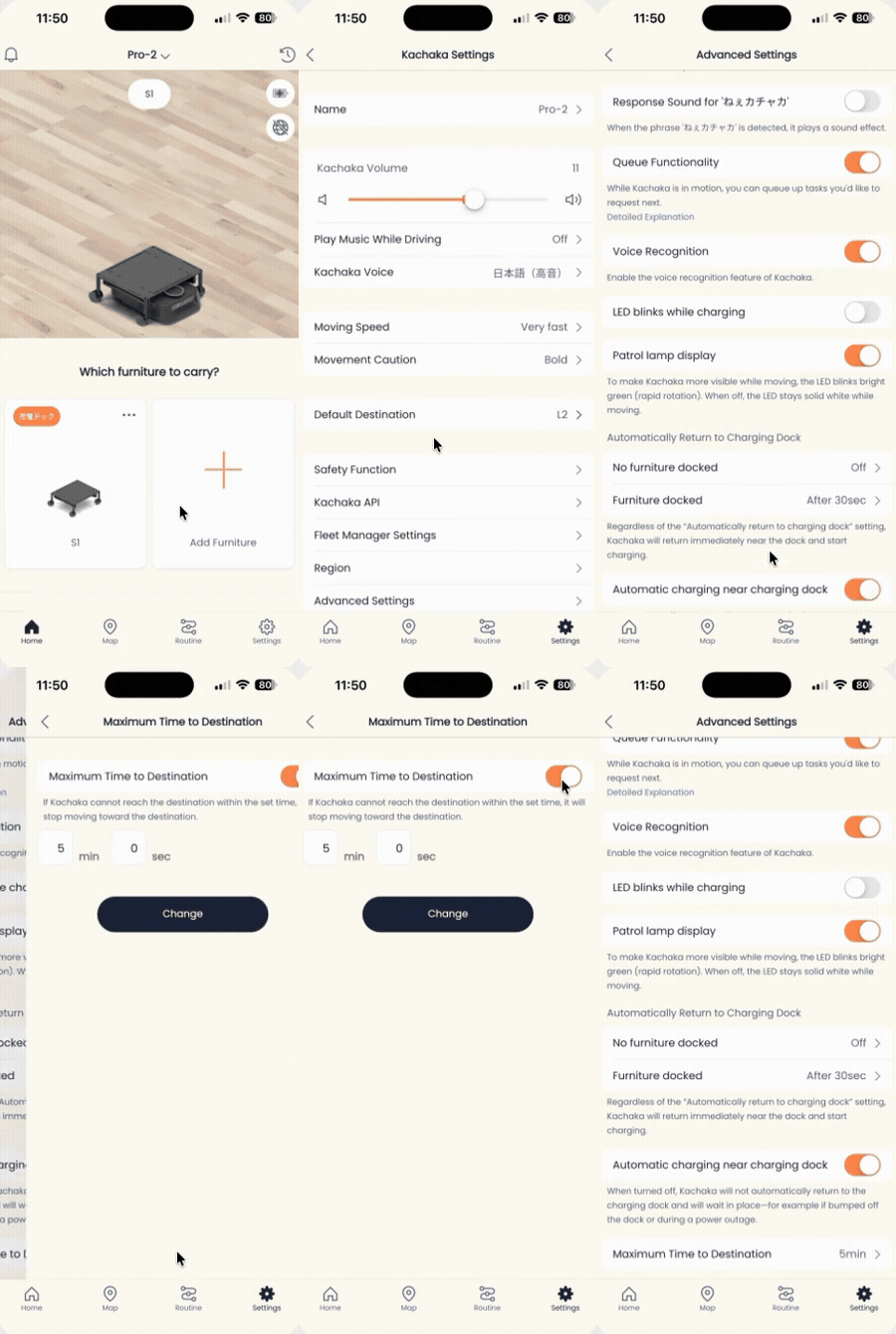
- Open the Kachaka app and go to the “Settings” tab.
- Under “Kachaka Settings,” tap the Kachaka you want to configure.
- Tap “Detailed Settings.”
- Tap “Destination Arrival Time Limit.”
- Toggle “Destination Arrival Time Limit” on.
- Set your preferred time, then tap “Change” to save.
From then on, this Kachaka will use the time you set as the limit for every furniture-carrying trip.
Tips for using it together with other settings
- If the robot often “gives up” before arriving, first confirm whether the distance is simply too far for the current limit before deciding to extend it.
- If it repeatedly fails to arrive and time doesn’t seem to be the cause, the issue is usually a blocked path or position drift. Work through Cannot Reach Destination or Dock With Shelf step by step.
- For long trips where you want a fixed route rather than the robot detouring each time, also set up driving routes and waypoints.
Screens