Furniture Integration Mode (Charging While Docked)
Furniture Integration Mode keeps Kachaka docked with its furniture both while moving and while charging. With this mode on, the robot no longer repeatedly docks and undocks; instead it moves around as one unit with the furniture. If you only register a single piece of furniture and want it to stay attached to the base at all times, this is the smoothest way to run.
When to use it
- You only use a single piece of furniture and never need to switch between several.
- You want Kachaka to keep carrying the furniture at all times, staying docked even when it returns to the charging dock rather than setting the furniture down.
- You want to prevent accidental taps that leave the furniture stranded mid-route (see the “Keep holding furniture” setting below).
If you need to switch between and deliver multiple pieces of furniture, do not enable this mode. See Registering Furniture and Adding Aliases and Loading and Picking Up Furniture instead.
Steps (software 3.2.6 and later)
On software version 3.2.6 and later, Furniture Integration Mode is split into two independent toggles:
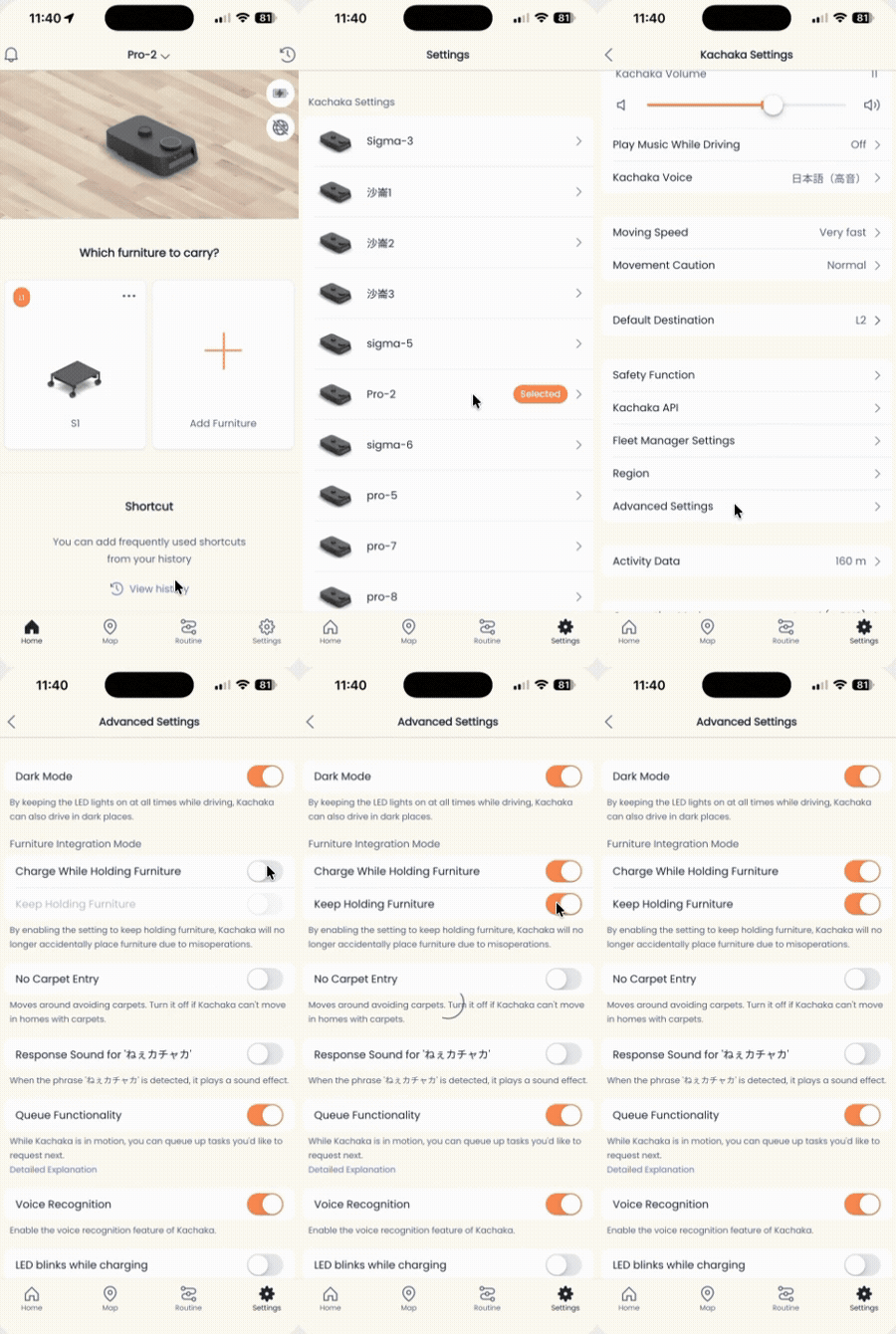
- Open the Kachaka App and tap the “Settings” tab at the bottom.
- Under “Kachaka Settings,” tap the Kachaka you want to configure.
- Tap “Advanced Settings” in the center of the screen.
- In the “Furniture Integration Mode” section, adjust the two toggles:
- Charge while holding furniture
- On: the robot can charge while still docked with the furniture.
- Off: the robot cannot charge while docked with furniture (you must set the furniture down first).
- Keep holding furniture
- On: the “Put furniture away” and “Place furniture here” buttons disappear from the App, preventing accidental drops.
- Off: those buttons stay visible, so you can set down or store the furniture at any time.
To check your current software version, see Checking Your App and Robot Software Versions.
Steps (software before 3.2.6)
Older software versions have only a single toggle:
- Open the Kachaka App and tap the “Settings” tab.
- Under “Kachaka Settings,” tap the target Kachaka.
- Tap “Advanced Settings.”
- Tap the “Furniture Integration Mode” toggle:
- On: the robot can charge while docked with furniture (you cannot register two or more pieces of furniture in this state).
- Off: the robot cannot charge while docked with furniture (no limit on the number of registered furniture pieces).
Limit on registered furniture
On older software (before 3.2.6), enabling this mode binds the base to a single piece of furniture, so you cannot register a second piece; you must turn the mode off to register more. Newer software (3.2.6 and later) splits charging and docking into two separate toggles for more flexibility. Choose whether to enable it based on how you actually use the robot.
Screens