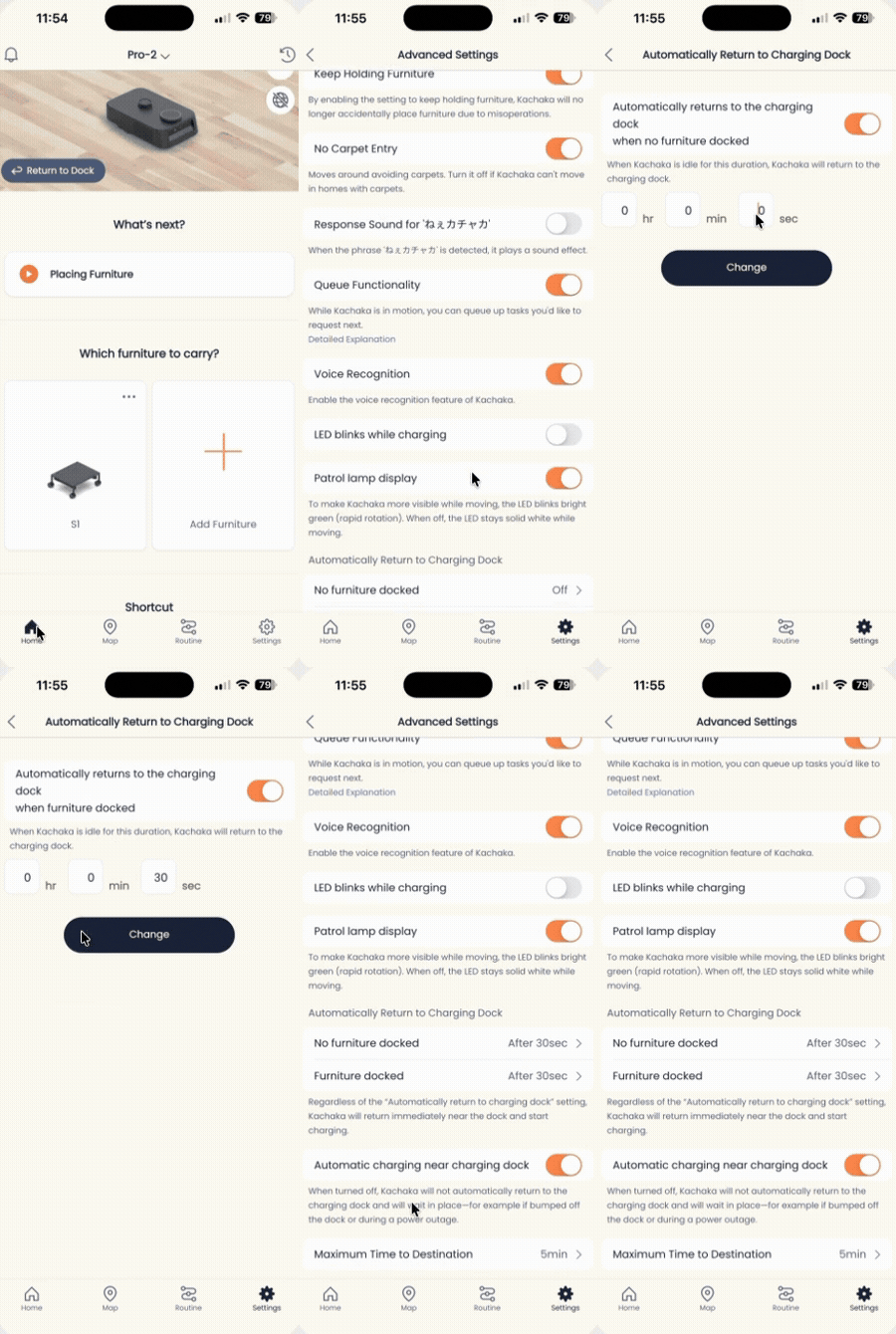
Set the Auto-Return-to-Dock Timer
After a delivery is done and the furniture is put away, Kachaka does not just sit where it stopped — once it has been idle for a while, it drives itself back to the charging dock to top up and stand by. You can adjust how long it waits before doing this, and you can set carrying furniture and not carrying furniture as two separate timers. This feature requires robot software version 3.1.10 or later.
Why adjust this timer
- Keep the robot on standby where it is: set a longer timer so Kachaka lingers at the spot after a task, ready for your next command.
- Get it charging sooner: set a shorter timer so it heads back to the dock quickly after going idle, keeping the battery topped up — useful for commercial sites that need long, continuous operation.
- Avoid blocking the way: in aisles, in front of a counter, or anywhere you do not want the robot to dwell, a shorter timer gets it out of the way faster.
Steps to set the timer
- Open the Kachaka App and go to the Settings tab.
- Under “Kachaka settings,” tap the specific Kachaka you want to configure.
- Tap “Advanced settings” in the middle of the screen.
- Find the auto-return-to-dock items and adjust the wait time for each.
How the two states differ
Which options you see depends on whether furniture integration mode is on.
When furniture integration mode is ON
- When not carrying furniture: once Kachaka has put furniture away, is holding nothing, and sits idle past this time, it returns to the dock.
- When carrying furniture: after Kachaka has delivered furniture to a destination but is still holding it with no new task, once it sits past this time it returns to the dock (together with the furniture).
When furniture integration mode is OFF
- Auto-return to dock: once Kachaka has put furniture away, is holding nothing, and sits idle past this time, it returns to the dock.
- Auto-place furniture: after Kachaka has delivered furniture but is still holding it with no new task, once it sits past this time it sets the furniture down on the spot instead of carrying it back to the dock.
In short: with the mode off, a timeout leaves the furniture in place and the robot goes back alone; with the mode on, the robot carries the furniture back to charge. To choose which behavior you get, set the furniture integration mode switch first.
Screens