Wobble Under Heavy Loads: Gentle Start
When you load Kachaka (especially Kachaka Pro) close to its carrying limit, or carry a large item that extends beyond the base, the robot may visibly wobble the instant it starts moving. This is usually not a fault — sharp acceleration sets a top-heavy load swaying. Turning on Gentle Start switches Kachaka to a smooth ramp-up from a standstill, which greatly reduces the wobble.
Why it wobbles
- Load near the limit: The closer the weight is to the maximum carrying load, the more start-up inertia makes the load rock back and forth.
- Load larger than the base: When an item is bigger than the base, top-heavy, or overhangs the edges, the sway from a sharp start is amplified.
- Sharp acceleration: The default start-up acceleration is fine for typical loads but a bit fast for the cases above.
For each model’s body dimensions and carrying conditions, see the Hardware Specs. To set obstacle avoidance based on cargo size on a Kachaka Pro base, see Pro: Setting Cargo Size on the Base.
Turn on Gentle Start
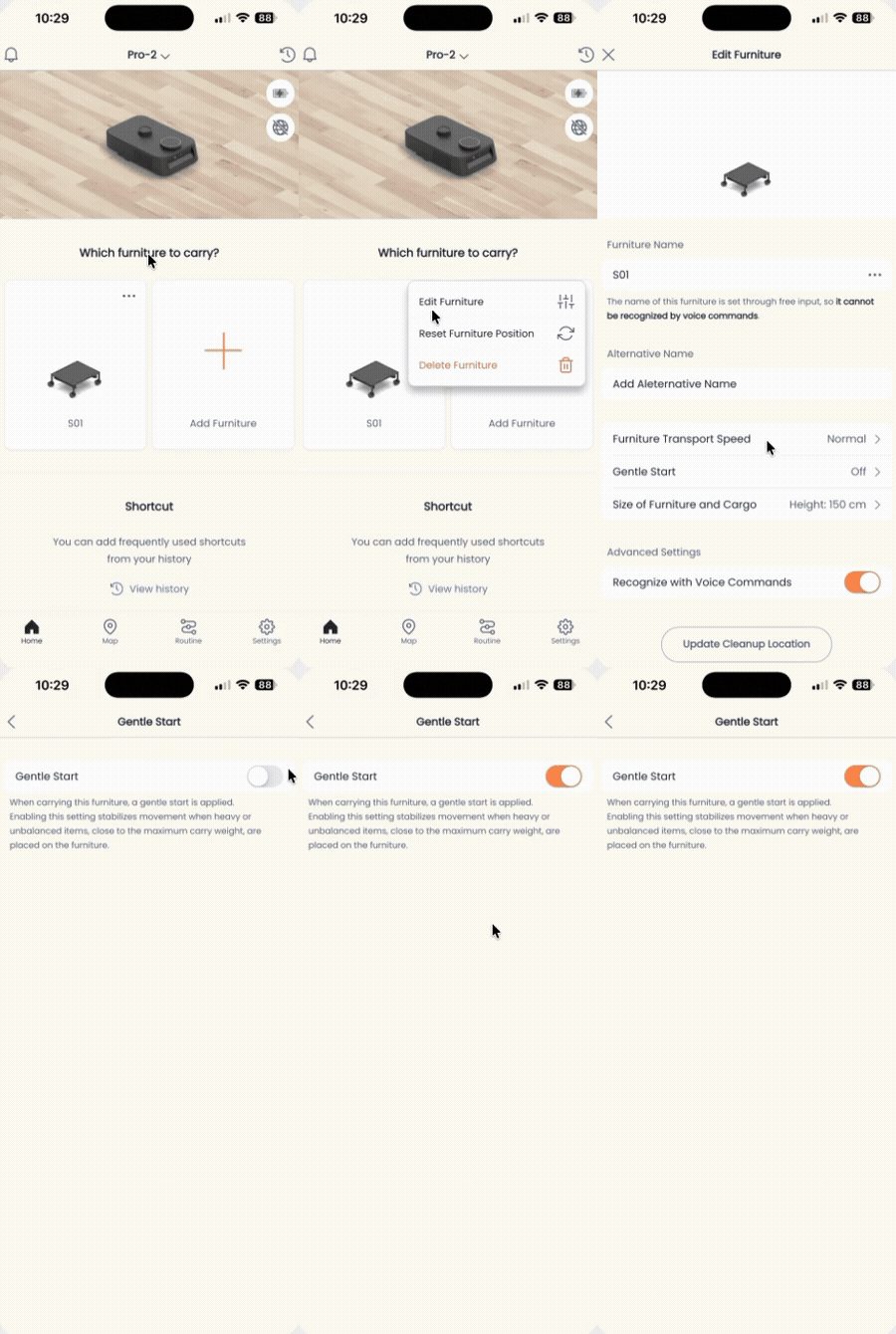
Gentle Start is a per-furniture setting. Enable it on the specific piece of furniture that carries the heavy load:
- Open the Kachaka App and go to the Furniture tab (or find the target furniture in the home screen’s furniture list).
- Find the furniture you want to adjust and tap its menu icon (・・・).
- Tap Edit Furniture.
- Find the Gentle Start option and toggle the switch on.
Once enabled, that piece of furniture ramps up more gently when it starts moving, so it drives more steadily. If it still wobbles, reduce the load, keep the load’s center of gravity low and centered, and avoid overhang beyond the base.
If it still wobbles or stops
- If it stops or swerves because of a protruding tabletop, table leg, or similar, see Protruding Obstacle Detection.
- To slow the overall travel speed, see Adjusting Movement Speed.
- Never exceed the maximum carrying load to fit more on, and do not add your own modifications to the base or shelf — doing so can cause abnormal behavior and affect your warranty. See Cautions on Modifying Kachaka Shelves.
Screens