
Cautions on Modifying Kachaka Shelves
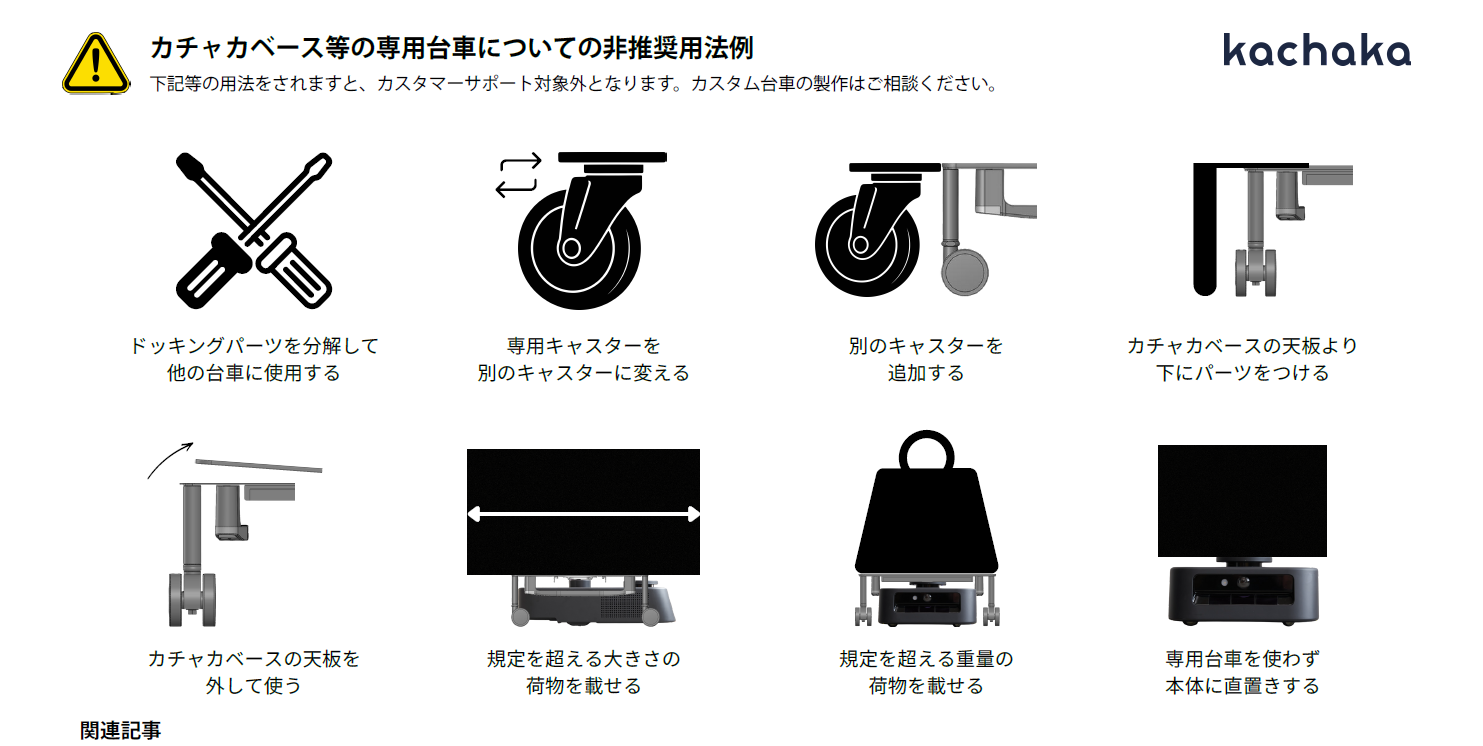
Kachaka’s transport capability rests on a factory-tuned balance between three things: the base, the sensors, and the dedicated shelves. The moment you customize a dedicated 2-tier or 3-tier shelf, or add non-original structures onto the Kachaka Base, that balance breaks down.
Customizing the dedicated shelves or the base is not covered by the warranty or the operation guarantee. A modified robot may behave unpredictably or fail outright.
Three Most Common Problem Modifications
1. Interfering With the LiDAR Sensor, Disabling Autonomous Movement
Kachaka relies on its onboard obstacle-detection LiDAR sensor to read its surroundings. If you add casters to a shelf or cart, or a modification blocks or interferes with the LiDAR scan, the sensor can no longer work correctly.
- Effect: The robot cannot estimate its own position or plan a route, and ultimately loses the ability to move autonomously.
For how LiDAR and the other in-motion safety detections work, see Safety Detection: Floor Obstacles, Drop-offs & Body Detection Height.
2. Adding or Enlarging Casters, Making Driving Unstable
The Kachaka Base is designed to drive on 4 casters. The following modifications upset that balance:
-
Adding extra casters on the shelf side so the whole unit runs on 6 or more casters in contact with the floor.
-
An upper structure that extends far beyond the Kachaka Base, protruding to the rear or the sides.
-
Effect: Driving becomes unstable, the robot tends to stray off route, and it may even be unable to turn properly.
For correct shelf and base dimensions, see Kachaka Shelf Specs: Dimensions & Weight. When loading cargo on the base, Kachaka Pro users should follow the limits and settings in Pro: Setting Cargo Size on the Base rather than improvising add-ons.
3. Loading Beyond the Rated Weight or Size
Carrying shelves or items that exceed the Kachaka Base’s rated weight or rated size.
- Effect: This can cause device failure, excessive battery drain, wobble and slipping while driving, excessive tire wear, and even tipping over.
If the unit wobbles under a heavy load, the correct fix is to stay within spec and turn on Wobble Under Heavy Loads: Gentle Start — not to modify the shelf or add casters to force it through.
Warranty and Repair Responsibility
- Not covered by warranty: Sigma accepts no responsibility for any accident, fault, damage, or malfunction arising from the use of a modified shelf.
- Repair costs: If a modification causes the Kachaka Base or Kachaka Pro unit to fail, repair may be chargeable.
To use Kachaka safely, do not use modified upper structures. If you need a custom integration or add-on, contact Sigma first so we can assess feasibility and the warranty implications — do not modify it yourself. When you need to report a fault, prepare the information described in Reporting Faults and Providing Investigation Info.